Smartcoach APIs
ROLLBACK BOOKING
Do the following to rollback an unpaid seat
https://api.smartcoach.co.ke/rollback/?apicall=rollback&api_key=<< api_key >>
Authentication(POST PARAMS)
API KeyQuery string
| Name | How to pass | if required |
|---|---|---|
| manifest id | manifest_id | required |
| seat number(s) | seat_number | required |
| booking id | booking_id | required (for deleting saved payment) |
PAYMENT CONFIRMATION WITH SEAT NUMBER AND MANIFEST
Do the following to confirm if a seat exists and paid
https://api.smartcoach.co.ke/confirm/payment.php?apicall=payment&api_key=<< api_key >>
Authentication(POST PARAMS)
API KeyQuery string
| Name | How to pass | if required |
|---|---|---|
| manifest id | manifest_id | required |
| seat number | seat_number | required |
| booking id | booking_id | required |
The reserve API has been updated
Reserving a seat
Do the following to reserve a seat (meaning to say that seat has been booked)There are two categories of vehicles: Buses (51 seater) and A Toyota Shark (16 Seater)
The arrangement for both may look like this:
| Name | Image | ||
|---|---|---|---|
| 16 SEATER | 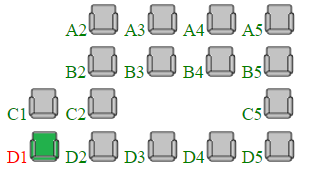 |
51 SEATER | 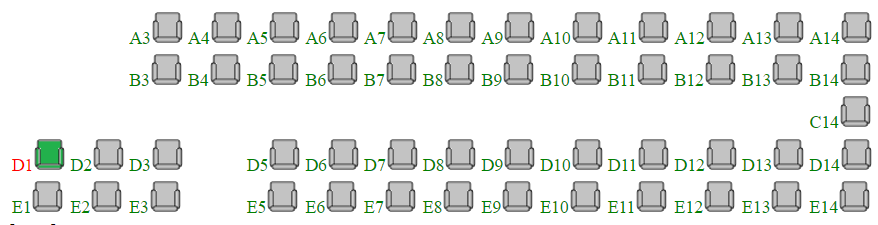 |
To reserve seat (GET PARAMS - your key and apicall)- The Manifest is only saved once and reused/updated
https://api.smartcoach.co.ke/confirm/?apicall=reserve&api_key=<< api_key >>
Authentication(POST PARAMS)
API KeyQuery string
| Name | How to pass | if required |
|---|---|---|
| manifest id | manifest_id | required |
| seat number | seat_number | required |
| phone | phone | required |
| id number | id_number | required |
| customer name | customer_name | required |
| residence | residence | required |
To get all reserved seats API (ALL GET)
https://api.smartcoach.co.ke/confirm/?apicall=reserved&api_key=<< api_key >>&manifest_id=26982
Now after reserving, to get all available seats API (ALL GET)
https://api.smartcoach.co.ke/confirm/?apicall=available_seats&api_key=<< api_key >>&manifest_id=26982
The api is found at api.smartcoach.co.ke, so a simple use case scenarios for GET /buses to return all the buses available or GET /manifest to show all asigned buses with the fares etc will be
https://api.smartcoach.co.ke/buses/?api_key=<< api_key >>
Basic query
The Api allows you to access buses, routes, pickupzones and manifest using the Smartcoach Api, login as developer at the console and create an app if you dont have oneThe api is found at api.smartcoach.co.ke, so a simple use case scenarios for GET /buses to return all the buses available or GET /manifest to show all asigned buses with the fares etc will be
https://api.smartcoach.co.ke/buses/?api_key=<< api_key >>
Buses
Authentication
API KeyQuery string
| api key | string default:<< api_key >> | required |
Response
| id | integer | optional |
| vehicle_registration | string | optional |
| vehicle_make | string | optional |
| vehicle_model | string | optional |
Available routes
https://api.smartcoach.co.ke/routes/?api_key=<< api_key >>
For specific route
https://api.smartcoach.co.ke/routes/?id=33000&api_key=<< api_key >>
Authentication
API KeyQuery string
| api key | string default:<< api_key >> | required |
Response
| id | integer | optional |
| terminus | string | optional |
| destination | string | optional |
| route | string | optional |
Available pickup zones
https://api.smartcoach.co.ke/pickupzones/?api_key=<< api_key >>
For specific pickup zone
https://api.smartcoach.co.ke/pickupzones/?id=33000&api_key=<< api_key >>
Authentication
API KeyQuery string
| api key | string default:<< api_key >> | required |
Response
| id | integer | optional |
| route_id | string | optional |
| route_name | string | optional |
| pickup_zone | string | optional |
Manifest
https://api.smartcoach.co.ke/manifest/?api_key=<< api_key >>
For specific manifest
https://api.smartcoach.co.ke/manifest/?id=33000&api_key=<< api_key >>
Authentication
API KeyQuery string
| api key | string default:<< api_key >> | required |
Response
| id | integer | optional |
| ref_no | string | optional |
| terminus | string | optional |
| destination | string | optional |
| route_name | string | optional |
| fare | double | optional |
| driver_id | integer | optional |
| codriver_id | integer | optional |
| vehicle_registration | string | optional |
| capacity | integer | optional |
| departure_date | string | optional |
| departure_time | string | optional |
| estimated_arrival | string | optional |
| shift | string | optional |
| manifest_status | string | optional |
Manifest for Specific Date
For example manifest for the Date 28/11/2022:
https://api.smartcoach.co.ke/manifest/?travel_date=28-11-2022&api_key=<< api_key >>
Authentication
API KeyQuery string
| api key | string default:<< api_key >> | required |
Response
| id | integer | optional |
| ref_no | string | optional |
| terminus | string | optional |
| destination | string | optional |
| route_name | string | optional |
| fare | double | optional |
| driver_id | integer | optional |
| codriver_id | integer | optional |
| vehicle_registration | string | optional |
| capacity | integer | optional |
| departure_date | string | optional (Chosen date on query) |
| departure_time | string | optional (dependant on Chosen date on query) |
| estimated_arrival | string | optional |
| shift | string | optional |
| manifest_status | string | optional |
Catching errors
Some of the errors that could could rise include:
1. Invalid API call

--means you have not included the API in your request
--Solution:Create an app on developer portal and include in your GET request

------------------------

------------------------

Sample error response

{"error":true,"message":"Invalid API Call"}